




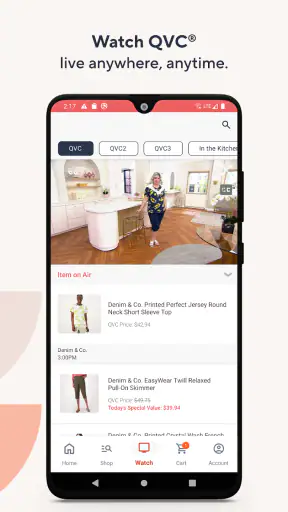
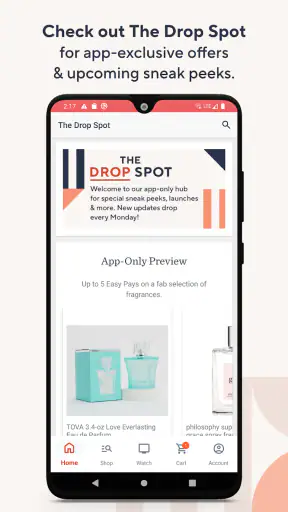

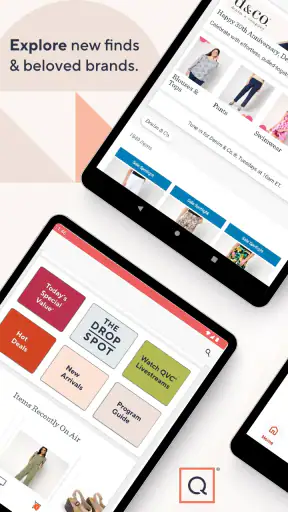
I found QVC Mobile Shopping most useful when I treated it as a companion to QVC’s televised shopping experience rather than as a general-purpose marketplace. It brings QVC, Inc.’s shopping service to an Android phone, letting me browse products, watch the shopping presentation, and move from discovery to checkout without sitting in front of a television. The app is free, aimed at Everyone, and belongs to the shopping category, but its real appeal is more specific: it suits people who already like QVC’s demonstrations, hosts, product explanations, and curated selection.
My first impression was that the app makes the most sense for browsing with intent. I can open it while relaxing at home, look through current offers, inspect a product that caught my attention on television, or use it when I remember something I wanted to check later. It is not trying to replace every online retailer. Instead, it gives QVC’s format a more flexible screen and makes the shopping process less tied to a broadcast schedule.
How I use QVC Mobile Shopping from discovery to checkout
The basic workflow is straightforward. I start by browsing what is currently being featured, then narrow my attention to a product rather than scrolling endlessly. Product pages are where I spend most of my time because the important decision is rarely just “does this look interesting?” I want to check the description, available choices, images, shipping information, and the final cost before committing.
That last step matters especially with clothing, beauty items, electronics, and home products. A television presentation can make an item feel immediately appealing, but the phone view is better for slowing down and checking the details. I use the product page as a pause button: I compare colors or sizes, read the wording carefully, and make sure I understand what is included. This habit helps prevent impulse purchases caused by a persuasive demonstration.
The app is also convenient when I have seen a product on QVC but do not want to make the purchase immediately. Instead of trying to remember the product name, I can search within the app and revisit the listing when I have time to think. That is one of its strongest everyday uses. It turns a short television moment into something I can examine at my own pace.
For a realistic example, imagine watching a kitchen item being demonstrated while preparing dinner. I might notice the product but not be ready to order. Later, I can open the app, search for it, review the available options, and decide whether the practical benefits justify the price. If I am shopping for someone else, I can also use the product information to check whether the size, color, or intended use makes sense before placing an order.
I would not use the app exactly like a local store finder or a broad comparison-shopping tool. QVC’s selection is curated around its own programming and retail catalog, so the experience is more guided than searching across thousands of unrelated sellers. That can make browsing easier, but it also means I may need another retailer when I want the widest possible range of brands, the fastest delivery comparison, or a product that is not part of QVC’s offering.
What I check before placing an order
My most useful routine is to separate entertainment from evaluation. I may enjoy the host’s explanation or the live demonstration, but I still check the product information independently. I look at the exact variant, included accessories, measurements, material details, and any conditions attached to the offer. This is particularly important for apparel, where a familiar brand name does not guarantee that my usual size will fit the same way.
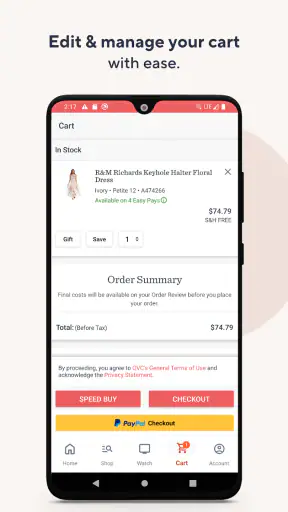
I also review the cart before checkout instead of assuming that the first displayed amount is the complete picture. I check quantity, selected options, shipping details, and the order total. This is a small step, but it catches the kind of mistake that is easy to make when a product is presented as a limited or especially attractive opportunity.
Another practical habit is to avoid saving a product mentally as “the blue one” or “the large one.” I confirm the actual selection on the product page and again in the cart. This is especially helpful when several colorways or sizes appear close together. The app makes shopping accessible, but careful reading remains the user’s responsibility.
Where the app fits beside television and other retailers
QVC Mobile Shopping works best when I want the context that comes with QVC’s presentation but the control of a phone. Television is good at showing how a product behaves in real use, while the app is better for reviewing details and completing the purchase privately. I can move between those two modes without treating them as competing experiences.
Compared with a conventional online marketplace, the app feels less like an enormous warehouse and more like a programmed shopping channel. That is helpful when I prefer recommendations and demonstrations over an overwhelming list of nearly identical products. The trade-off is choice. A marketplace may offer more sellers, more user-generated comparisons, and more competing prices for the same type of item.
Compared with a retailer’s standard shopping app, QVC’s advantage is the connection to its on-air identity. If I value product storytelling and demonstrations, that context can make it easier to understand why an item is being offered. If I already know exactly what I want and simply need the cheapest or quickest way to buy it, a traditional search-first retailer may be more efficient.
Settings and habits that make the experience calmer
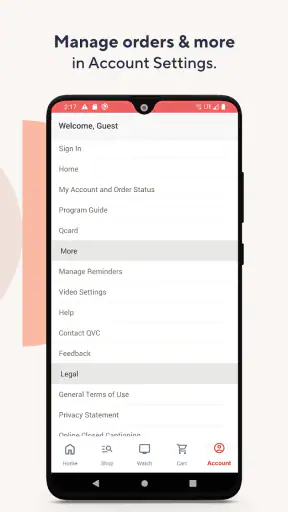
I do not approach the app by changing every available option. I first make sure my account and checkout details are correct, because a smooth purchase depends more on accurate information than on cosmetic preferences. I review the account area, confirm the details used for orders, and make sure I understand how the app presents notifications or shopping updates.
Notifications deserve a deliberate decision. They can be useful if I want reminders about QVC activity or products I am actively following, but they can also turn casual browsing into repeated prompts to shop. I prefer enabling only the alerts that support a clear purpose. If I am not watching for a particular item, I would rather open the app when I choose than let every notification interrupt my day.
On Android, I also check the system-level notification controls instead of relying only on the app’s own choices. This gives me a second layer of control if the alerts become too frequent. It is a simple but important distinction: an app setting may organize its notification preferences, while the phone’s settings determine how those alerts behave alongside everything else on the device.
I keep the app updated through the normal store process. The current version is 5.30.0, and the listed minimum operating-system requirement is Android 9. That makes compatibility worth checking before installation on an older phone. For most people using a reasonably modern Android device, this should not be a difficult barrier, but it is still sensible to verify the operating-system version first rather than discovering the issue at install time.
The app has been available since June 3, 2010, which gives it a long history as a mobile shopping product. I do not interpret that age as a guarantee that every screen will match my personal preferences, but it does explain why the app feels designed around an established shopping service rather than a new experimental concept.
My preferred setup for repeat purchases
When I am considering a repeat purchase, I avoid starting from a blank search every time. I use the app’s browsing and search flow to return to the relevant product area, then verify the current options before adding anything. This is safer than relying on memory because availability, variants, and presentation can change between visits.
I also keep a short mental checklist for products I buy repeatedly: correct size, preferred color, quantity, shipping destination, and whether I am buying the same item or a similar replacement. The app can make the return to a familiar product quick, but the final verification prevents a fast workflow from becoming a careless one.
For gifts, I take the opposite approach. I spend more time reading the product details and considering whether the recipient would actually use the item. QVC’s presentation can be persuasive, so I find it useful to ask myself whether I would still choose the product without the demonstration. That question is a good filter for both gifts and personal purchases.
Faster patterns that save me from unnecessary browsing
The quickest way I have found to use the app is to begin with a specific goal. Searching for a product type, brand, or remembered item is usually more efficient than opening the app and scrolling through everything. Browsing still has value when I want inspiration, but goal-based searching reduces the chance of filling the cart with products I never intended to consider.
I also use a two-pass method. During the first pass, I collect possibilities without ordering. During the second, I compare the serious candidates using the product details, options, and total cost. This works well for home goods and beauty products, where several items may look appealing but differ in size, accessories, or intended use.
Another useful pattern is to watch or remember the demonstration, then use the app for verification rather than persuasion. I ask what problem the product solves, what its limitations might be, and whether I already own something that performs the same job. This approach lets me benefit from QVC’s explanatory format without allowing the presentation to make the decision for me.
When I am short on time, I do not try to complete the entire shopping journey while distracted. I would rather open the product, check the essential information, and leave the purchase for a calmer moment if anything is unclear. A mobile app makes immediate checkout easy, but convenience should not remove the review step.
Useful ways to decide who should use it
I think the app is a strong fit for existing QVC viewers, shoppers who enjoy demonstrations, and people who prefer a curated catalog to a huge marketplace. It is also useful for anyone who wants to shop from a phone after seeing an item on television. The free download removes an initial cost barrier, and the Everyone age rating makes it broadly accessible as a shopping application.
It is less suitable for someone who wants a pure price-comparison tool. If my only goal is to find the lowest available price across many retailers, I would choose a service built around broad comparison. Likewise, if I need extensive independent reviews from a large community before buying, a general marketplace may offer more of that kind of evidence.
I would also hesitate to recommend it as the only shopping app for a person who dislikes promotional presentation. QVC’s identity is part of the experience, and that is precisely what attracts some users while putting off others. The app is not a neutral product database; it carries the tone and structure of a shopping channel.
Limits I notice after using it more deliberately
The biggest limitation is not a missing button but the risk of buying through momentum. Product demonstrations are designed to maintain interest, and the phone makes it easy to continue from interest to cart. I have to create my own stopping points. Reading the details, checking the total, and waiting before purchase are not glamorous techniques, but they make the experience more reliable.
Another limitation is that the app cannot remove the uncertainty that comes with shopping for tactile products on a screen. Clothing fit, texture, sound quality, and the real size of a household item may still be difficult to judge from images and descriptions. The television presentation can help, but it is not the same as handling the product myself.
There is also a trade-off between curation and breadth. QVC’s focused selection can save time, yet I may not see the same variety available through a broad marketplace. If I am looking for a very specific technical specification or an obscure replacement part, I would probably search elsewhere first.
Performance and convenience can also depend on the phone itself, the Android version, and the quality of the connection. I avoid making a purchase while moving between weak networks or when a page has not fully loaded. That is not unique to QVC, but shopping apps deserve extra caution because incomplete information can affect the final choice.
I pay particular attention to the difference between an attractive presentation and a genuinely suitable product. An item may be well demonstrated and still be wrong for my space, budget, routine, or skill level. The app gives me access to the offer; it does not make that judgment on my behalf. Experienced use means treating the product page as a research step, not merely a checkout screen.
How I use it without losing control of spending
My best safeguard is to decide on a purpose before opening the app. “I am checking the item I saw earlier” is more useful than “I will see what is available.” I also avoid adding several alternatives to the cart just to keep them visible. If I need to compare, I write down the key differences or revisit the product pages one at a time.
I make a point of checking whether I already have a similar product. This is especially important with kitchen tools, home accessories, beauty products, and clothing. QVC’s presentation can reveal a clever feature, but a clever feature is not automatically worth owning twice.
For larger or more considered purchases, I leave the app and return later. If the product still fits my needs after the initial excitement has passed, I feel more confident. If I forget about it completely, that tells me the purchase was probably driven by the moment rather than by a lasting need.
My verdict after building a repeatable workflow
QVC Mobile Shopping is a focused shopping app with a clear personality. I like it most when I use it to extend QVC’s demonstrations into a slower, more practical mobile workflow: find the item, inspect the details, compare the options, review the cart, and then decide. That sequence makes the app more useful than simply tapping through an appealing presentation.
Its strongest advantage is the combination of curated products and QVC’s familiar shopping format. The app is free, developed by QVC, Inc., and has built a substantial audience, with an average rating of 4.2 from around thirty-one thousand ratings and over one million installs. Those figures suggest that the service has become a regular mobile destination for many shoppers, although popularity does not remove the need to check whether its style suits me.
I would recommend it to a friend who already watches QVC or enjoys learning about products through demonstrations. I would also recommend it to someone who wants to revisit a television-discovered item without rushing to a phone call or waiting for the next broadcast. The app is especially comfortable for browsing from home, reviewing a product later, and managing a purchase after the initial presentation.
I would not make it my first recommendation for a shopper who wants the broadest possible catalog, aggressive cross-retailer price comparison, or a review-heavy research environment. In those cases, a general marketplace or comparison service is likely to be a better match. QVC Mobile Shopping is strongest when its curated approach is a benefit rather than a restriction.
My final advice is simple: use the app with a plan. Keep notifications purposeful, search when you know what you are looking for, use product pages to verify rather than merely admire, and check every option in the cart before ordering. The best experience comes from combining QVC’s guided presentation with your own deliberate decision-making. Used that way, it becomes a convenient extension of QVC rather than just another place to browse.


